
CodeFlow
New · CodeFlow for After Effects

Claude made it.
Now edit it in After Effects.

CodeFlow turns motion videos made with Claude into native After Effects comps: real text, real keyframes, real layers. Nothing flattened, nothing to rebuild.

Free to try: 5 builds on us, then $20 lifetime license · After Effects 2022 or newer
CodeFlow in 30 seconds
1 · Claude Say the magic words

Claude writes your video as one HTML file. Make a new one, or prepare one you already have.

make it for CodeFlow
2 · Drop it in Converted on your computer

Drag the HTML onto the CodeFlow panel. It reads every frame itself: no AI, no tokens.

my-promo.html
3 · After Effects Native, editable comps

Click Build. Real text, keyframes and layers, with camera moves on parent layers.
TextShapesImagesPrecomps

From Claude to your timeline

Three steps. No exporting, no recreating, no flattened video.

1

Make it with Claude

Add the free CodeFlow skill to Claude, then ask it to make it for CodeFlow. Claude writes your video as one HTML file, tells you exactly where it saved it, and you can watch it in Chrome right away.

Cheap and fast. Claude only writes the video. The conversion to After Effects is done by the CodeFlow panel, without AI, so you don't pay tokens for it. There is nothing to run and nothing to install on top of the skill.

2

Open it in After Effects

Go to Window → Extensions → CodeFlow and drag the HTML file onto the panel. It converts the video right on your computer and tells you if anything could not be converted exactly.

3

Click Build

CodeFlow installs any missing fonts and builds native comps in their own folder. Your project is never overwritten, so you can keep adding more videos.

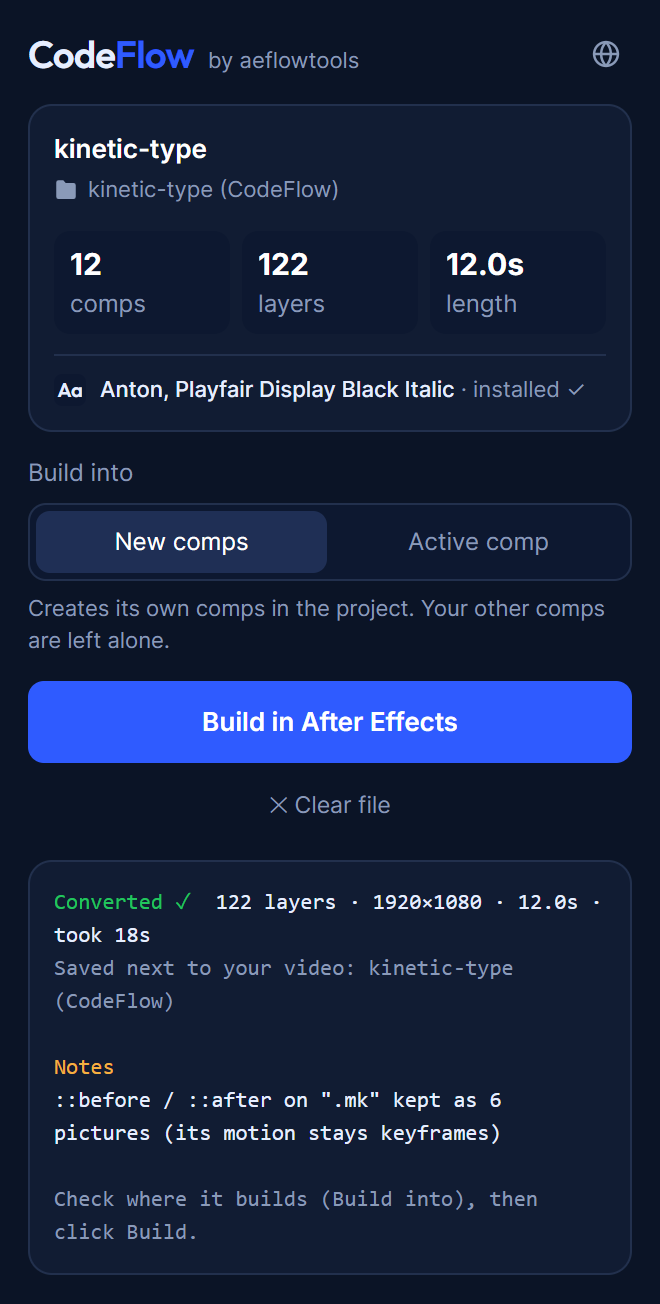
The CodeFlow panel after converting an HTML video: 12 comps, 122 layers, ready to build

It's After Effects, not a video file

Everything arrives the way a motion designer would have made it.

Aa

Real, editable text

Text stays text, in the right font. Fonts travel inside the file and install automatically. Word-by-word reveals stay real text layers you can retype.

∿

Real keyframes and easing

Bezier eases land in the Graph Editor, ready to tweak. No baked frames, no walls of keys.

◧

Native layers

Shape layers, masks, blur, drop shadow and gradients, built from the real After Effects tools.

▶

Converted on your computer, no AI

The panel plays your video frame by frame itself, with no tokens to pay: a 12-second video converts in under half a minute, and videos with lots of effects take a few minutes. Voice-over, music and video clips come along as audio and footage layers.

▤

Organized like a pro

A precomp for every clipped area, parent layers that carry camera moves, named layers, and a tidy project folder for every build.

✓

Looks like the original

In our tests, most converted videos match the video Claude made at 97–99% frame similarity, and the panel lists anything it could not convert exactly.

Step 1: install the extension

It's free to download, with 5 free builds on every computer so you can try it properly.

CodeFlow for After Effects Version 1.0.0 · After Effects 2022 or newer · Free to download
Download ↓
  1. Unzip the download. Inside: the installer (CodeFlow-1.0.0.zxp), the Claude skill, and a PDF manual.
  2. Open the .zxp file with a free ZXP installer, such as the aescripts ZXP Installer.
  3. Restart After Effects.
  4. Open Window → Extensions → CodeFlow. You're ready: you have 5 free builds.
  5. Make sure Google Chrome or Microsoft Edge is installed (free). CodeFlow uses it quietly in the background to read your video.

Step 2: add the free skill to Claude

The CodeFlow skill teaches Claude how to write your video so the CodeFlow panel can convert it. It's free, tiny, and open on GitHub.

Claude Code

Run these two commands, then restart Claude Code:

/plugin marketplace add aeflowtools-cpu/codeflow
/plugin install codeflow@aeflowtools
View on GitHub →

Claude app

Upload the skill file once:

  1. Use codeflow-skill.zip from your CodeFlow download (or get it below).
  2. Open Settings → Capabilities → Skills.
  3. Click Upload skill and choose the zip.
Get codeflow-skill.zip from GitHub ↓
Any Claude: the app, the Code tab or Claude Code No Node.js, no ffmpeg, no setup Google Chrome or Edge (the panel uses it to read the video)
TipClaude only has to write one file, so any way of using Claude works, including normal chat. The conversion itself happens in the CodeFlow panel on your computer, with no AI.

Free to try. $20 to keep going.

Use your 5 free builds to see it work on your own videos. Then unlock unlimited builds with a lifetime license: one payment, no subscription.

Free trial
Try it
$0
5 builds on each computer
  • ✓ Every feature included
  • ✓ No card, no sign-up
  • ✓ Real After Effects comps, yours to keep
Download free ↓
Install it, then ask Claude for your first file.
Lifetime license
CodeFlow
$20
One-time payment · never expires
  • ✓ Unlimited builds
  • ✓ 1 computer, move it any time
  • ✓ Fonts included in every file
  • ✓ No subscription
Buy lifetime license →
Secure checkout via Gumroad · Your license key arrives right after checkout.

Ready to unlock? Two steps

1

Buy your license

Check out on Gumroad. Your license key arrives right away.

2

Paste it into CodeFlow

In After Effects open Window → Extensions → CodeFlow, click Enter key, paste your key and click Activate. Unlimited builds from then on.

Questions

What's free and what costs money?

The extension and the Claude skill are both free to download, and you get 5 free builds on every computer. After that CodeFlow needs a lifetime license key: $20, paid once, for everyone. (Bangladesh has its own local price and shop.)

What happens after the 5 free builds?

CodeFlow asks for a license key before it builds more. Everything you've already built stays in your After Effects project and keeps working, with or without CodeFlow.

Do I need Claude?

Yes, to make the video. With the free CodeFlow skill, Claude writes your video as one HTML file. Any way of using Claude works (the app, the Code tab, Claude Code), because Claude only has to write a file. The conversion to After Effects is done by the CodeFlow panel itself, without AI, so CodeFlow adds no AI cost of its own.

Can I convert a video I already made?

Yes. Any HTML video that plays by itself (GSAP, CSS animations, SVG, canvas, plain JavaScript) can be dropped on the panel as it is: it finds the length and size itself. Video clips (H.264 MP4) come in as footage layers sized exactly as in your page; canvas drawing comes in as a picture sequence.

Is the text really editable?

Yes: real text layers in the right font. One catch: if your SVGs come from Figma with Outline text turned on (its default), the words are only shapes and there's no text to recover. Export them again with Outline text unchecked.

Will it look exactly like my video?

In our tests, built in After Effects, most videos match the original at 97–99% frame similarity, and the panel lists the parts that came in as pictures. Blend modes become blending modes and CSS 3D becomes an After Effects camera with 3D layers; canvas / WebGL drawing, gradients with 3+ colours and noise textures come in as pictures that still move with keyframes. Backdrop blur is not converted.

How many computers can I use it on?

Each license works on 1 computer at a time. You can move it to another computer whenever you want, with no limit: enter your key on the new computer and click Deactivate next to the old one.

Does it need internet?

Yes. CodeFlow checks your license (or your free builds) online when it opens and before each build. Your projects and files never leave your computer: only your license and computer details are checked.

How do I get updates?

When a new version is out, CodeFlow shows an update message in the panel. Download the newest version from the top of this page and install it over the old one. Your license keeps working.

I have a question or a problem

Write to contact@aeflowtools.com and we'll help.